Mod Manager for TrackDayR
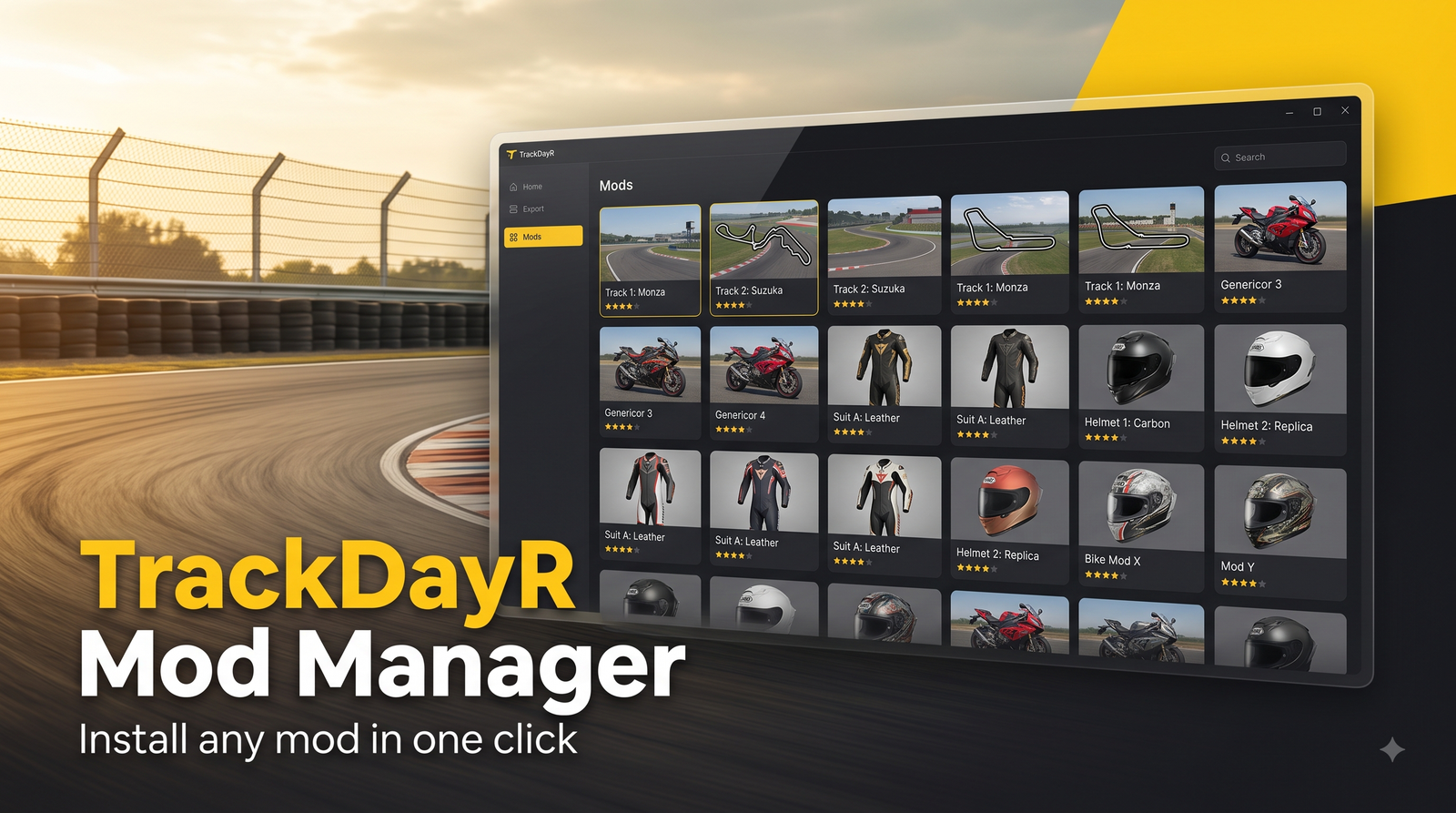
Tired of downloading mods, unzipping them, and hunting for the right folder? TrackDayR Mod Manager does it all for you. It's a free desktop app that browses the tdrmods.com catalog and installs any mod into the correct game folder with a single click.
What it does
- Browse the full tdrmods catalog — bikes, tracks, rider gear (helmets, tops, bottoms, gloves, full suits) and extensions — right inside the app, with thumbnails, authors and descriptions.
- One-click install: it downloads the mod, unpacks it, and places it in the correct TrackDayR folder automatically (bikes, tracks, gears, extensions). No manual copying.
- Finds your game folder on its own — it reads TrackDayR's own mod path, so mods always land in the right place.
- Handles the many different download hosts for you. Most are fully automatic; a couple of slower hosts need one extra click, and the app walks you through it.
- "Your Mods" tab to see everything you've installed and remove anything with one click. The game's built-in content is protected, so you can't delete it by accident.
- Keeps itself up to date — when a new version is out you get a one-click update that installs and restarts the app on its own. No re-downloading.
- Available in English, Français and Italiano.
How to use
- Download and run the app (Windows). No installation, no Python needed.
- The first time, Windows may show "Windows protected your PC" because the app isn't code-signed yet — click More info → Run anyway. This is safe.
- Open Mods Catalog, pick what you want, hit Add to library. Launch TrackDayR and your mods are there.
Privacy: the app can show how many people are using it right now. This is fully anonymous — only a random ID and the app version, no name, no email, no IP kept, no mod list — and you can turn it off anytime in Settings.
Need help or have feedback? Join the TrackDayR Discord: https://discord.gg/eFjwdjxeEQ — as an early user your feedback really helps.
Disclaimer: This is an independent, community-made tool that browses the community website tdrmods.com. All bikes, tracks and other mods — and any brand names or logos they may contain — belong to their respective creators and owners. Not affiliated with, sponsored by, or endorsed by tdrmods.com. Mods are downloaded from third-party sites; use at your own discretion.
Made with ❤️ by the MadCow team for the TrackDayR community.
Comments & Reviews
Loading comments...
Links
|
Type
|
Download Button
|
|---|---|
|
This is the required content you need to download.
|
|
Author Information
|
Profile
|
Uploads
|
Total Downloads
|
|---|---|---|
MadCow |
9 | 5360 |
Post Information
|
Release Date
|
Last Update
|
Category
|
|---|---|---|
| 11 August 2026 | 23 September 2026 | Official |
|
Views
|
Downloads
|
Game Compatibility Version
|
|---|---|---|
| 5011 | 2966 | 1.0.124.206 |
Post Changelog
-
Updated to version
v 1.6Automatic disk cleanup. The app now clears its temporary download cache after every install, so it never piles up. On the first launch after this update it also frees any space older versions had left behind - automatically, nothing to do. You can check and empty the cache anytime in Settings > Download cache.
-
Updated to version
v 1.5Now powered by the official tdrmods API: the catalog loads fast and reliably, always up to date, with accurate categories and instant one-click installs.
-
Updated to version
v 1.4Much faster catalog: it opens instantly from the last saved copy and refreshes in the background, and downloads are now parallel. No more long waits.
-
Created with version
v 1.3First Public Release
User Reviews
5.00
out of 5・2
reviewsReview data
-
5 star reviews
-
2 (100%)
-
4 star reviews
-
0 (0%)
-
3 star reviews
-
0 (0%)
-
2 star reviews
-
0 (0%)
-
1 star reviews
-
0 (0%)
Installation Instructions
1. Download and run the app (Windows). No installation, no Python needed. 2. The first time, Windows may show "Windows protected your PC" because the app isn't code-signed yet — click More info → Run anyway. This is safe.