TDR Mods
Login
TDR Mods

Welcome to TDR Mods

Discover the best mods for TrackDayR, created by our amazing community.

Best Mods of the Month

View All →
Category: Official
Tag: modding
Tag: Modding Tools

Mod Manager for TrackDayR

5.0

(2)

5622

3352

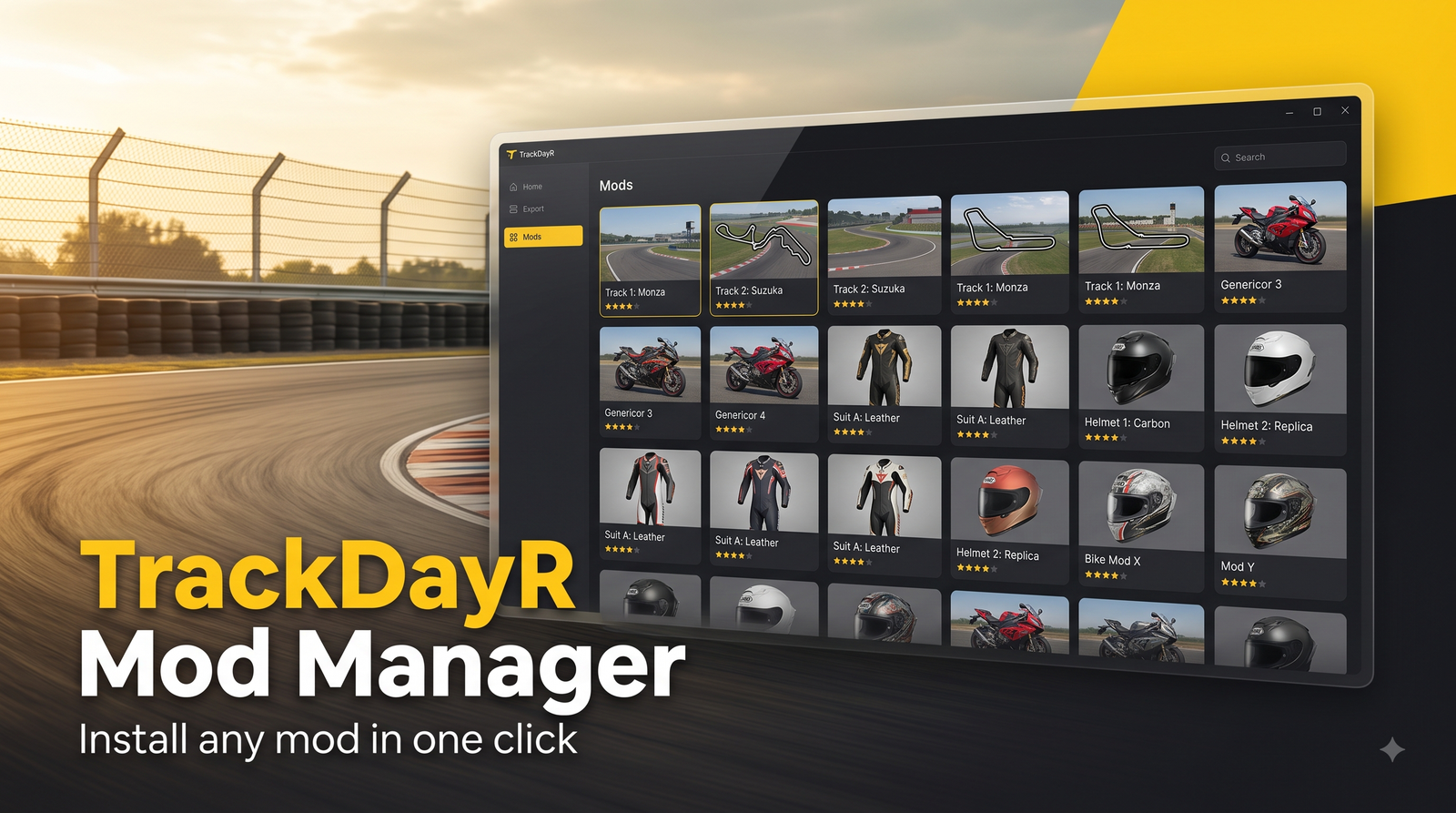
Tired of downloading mods, unzipping them, and hunting for the right folder? TrackDayR Mod Manager does it all for you. It's a free desktop app that browses the tdrmods.com catalog and installs any mod into the correct game folder with a single click.What it doesBrowse the full tdrmods catalog — bikes, tracks, rider gear (helmets, tops, bottoms, gloves, full suits) and extensions — right inside the app, with thumbnails, authors and descriptions.One-click install: it downloads the mod, unpacks it, and places it in the correct TrackDayR folder automatically (bikes, tracks, gears, extensions). No manual copying.Finds your game folder on its own — it reads TrackDayR's own mod path, so mods always land in the right place.Handles the many different download hosts for you. Most are fully automatic; a couple of slower hosts need one extra click, and the app walks you through it."Your Mods" tab to see everything you've installed and remove anything with one click. The game's built-in content is protected, so you can't delete it by accident.Keeps itself up to date — when a new version is out you get a one-click update that installs and restarts the app on its own. No re-downloading.Available in English, Français and Italiano.How to useDownload and run the app (Windows). No installation, no Python needed.The first time, Windows may show "Windows protected your PC" because the app isn't code-signed yet — click More info → Run anyway. This is safe.Open Mods Catalog, pick what you want, hit Add to library. Launch TrackDayR and your mods are there.Privacy: the app can show how many people are using it right now. This is fully anonymous — only a random ID and the app version, no name, no email, no IP kept, no mod list — and you can turn it off anytime in Settings.Need help or have feedback? Join the TrackDayR Discord: https://discord.gg/eFjwdjxeEQ — as an early user your feedback really helps.Disclaimer: This is an independent, community-made tool that browses the community website tdrmods.com. All bikes, tracks and other mods — and any brand names or logos they may contain — belong to their respective creators and owners. Not affiliated with, sponsored by, or endorsed by tdrmods.com. Mods are downloaded from third-party sites; use at your own discretion.Made with ❤️ by the MadCow team for the TrackDayR community.
Newly Added and Updated Mods

View All →
Category: Official
Tag: HDRP
Tag: MASK MAP
Tag: UNITY3D
Tag: UNITY TOOL

HDRP Map Packer

No ratings yet.

10

2

HDRP Map Packer is a small tool for modders who make bikes, gear and tracks for TrackDayR.TrackDayR uses Unity HDRP, and the HDRP/Lit material expects some maps packed into the channels of a single texture. Most texturing tools and freelancers deliver them as separate files, or packed the "Standard shader" way. This tool packs them correctly in a few clicks.WHAT IT DOES- Mask Map: R = Metallic, G = Ambient Occlusion, B = Detail Mask, A = Smoothness- Detail Map: R = Albedo (grey), G = Normal Y, B = Smoothness, A = Normal X- Base + Alpha: RGB = base colour, A = opacity- Saves a 32-bit TGA (optional RLE compression) or a 32-bit PNG, alpha included. Colour channels are kept intact even where alpha is 0.HOW TO USE IT1. Open the tool in your browser (Chrome, Edge or Firefox).2. Drop all your maps on the top bar. They are assigned by file name (metallic, ao, roughness, glossy, smoothness, detail, normal...). Or drop each map on its channel.3. Missing a map? Leave the slot empty and set a constant value with the slider.4. Check each channel in the preview (RGB, R, G, B, A), then click Save.HANDY DETAILS- Roughness maps are inverted to smoothness automatically when the file name contains "rough". Glossiness/smoothness maps are used as they are.- A Unity "MetallicSmoothness" texture is split for you: its red goes to Metallic, its alpha to Smoothness.- Maps of different sizes are resized to the largest one, and the tool tells you.- Reads PNG, JPG and TGA. EXR, TIFF and PSD are not supported: export them as PNG or TGA first.UNITY IMPORT SETTINGS- Mask Map and Detail Map: untick "sRGB (Color Texture)". Keep Texture Type on Default (not Normal map).- Base + Alpha: keep sRGB ticked.- Keep Alpha Source on "Input Texture Alpha".PRIVACYEverything runs in your browser. Your textures are never uploaded anywhere.

MadCow
MadCow
Developer

5 hours ago

Category: Official
Tag: Bike Modding

Modifier Tool

No ratings yet.

413

112

Officially Approved & Supported by the TrackDayR TeamModifierTool is a Windows application for modifying TrackDayR game files.It allows you to edit various properties of bikes and create, save, and load your own modifications without manually editing the game files.Features🏍️ Modify bike engine parameters⚙️ Modify gearbox and drivetrain settings🔊 Change engine sounds✏️ Edit bike in-game names💾 Save and load modifications🔄 Easily share modifications with others🖥️ Simple and modern Windows interface🔔 Automatic update detection🤝 Compatible with every version of the game

Re
real_unreal56

2 days ago

Best Modders of All Time

DeliciousTic-Tac
DeliciousTic-Tac
Verified

65 mods

174429 downloads

Sendo
Sendo
Verified

47 mods

163651 downloads

BKLF_FirstGear
BKLF_FirstGear

31 mods

120241 downloads

FPVS_13K11
FPVS_13K11

27 mods

53339 downloads

Discover the best mods for TrackDayR, created by our amazing community.

This website is not affiliated with TrackDayR and MadCow SRL.

© 2026 TDR Mods. All rights reserved.

Made with by Luca Pavan